



Paper documents scattered across the warehouse, data tracked in Excel sheets, lost parcels, delayed orders, operators walking kilometers every day for no reason. Anyone who has experienced (or managed) a situation like this knows how much it can slow down operations, increase costs, and negatively impact customer satisfaction.
This is where a WMS (Warehouse Management System) comes into play. A WMS software is warehouse management software designed to optimize, control, and automate every stage of internal logistics: goods receiving, storage, picking, packing, shipping, and real-time traceability.

A well-designed and properly implemented WMS software allows companies to digitalize warehouse workflows, reduce errors, improve operator productivity, and eliminate waste of time, space, paper, and resources. According to Mordor Intelligence, the global WMS market is expected to grow from USD 4.77 billion in 2026 to USD 10.89 billion by 2031, with a compound annual growth rate (CAGR) of 17,98%. In Europe specifically, Gartner also confirms this strong growth trend.
In this article, we explain what a WMS is, how it works, the benefits it provides, and why choosing the right Warehouse Management System can make a real difference in a company’s competitive growth.
WMS software: what it is and how it works
In logistics, WMS stands for Warehouse Management System. It is specialized software dedicated to optimizing warehouse logistics by controlling processes such as goods receiving, storage, picking, cross-docking, packing, and shipping. It helps companies digitalize inventory management, optimize space and movements, and ensure full product traceability.
A WMS works like a digital control tower: it collects, organizes, and manages all warehouse data within a single centralized platform. Management rules are defined in advance, for example where to store a specific product, how to prioritize picking, or which routes operators should follow. These rules are configured and customized on the software code, based on the company’s operational needs.
The first step is warehouse mapping: a digital representation of aisles, racks, loading/unloading zones, and work areas. From there, the WMS tracks every activity: it records movements, coordinates operators (often through handheld or mobile terminals), and updates inventory levels in real time. The result is a synchronized, efficient, and measurable operation of people, goods, space, and time—without relying on spreadsheets.
Here are the four main signs that highlight the need to adopt warehouse optimisation software:
- Frequent inventory errors.
- Picking times above industry benchmarks.
- Poor space utilization (e.g. congestion in certain areas).
- Difficult item traceability.

What a WMS software does: all core warehouse processes

A Warehouse Management System is designed to manage and optimize every single stage of the logistics operations that take place inside a warehouse. Let us take a closer look at the main processes that a WMS software controls and coordinates.
1. Goods identification and traceability
From the very first interaction with the warehouse, each item is uniquely identified using barcodes, QR codes or RFID tags. This allows the software to track every subsequent movement, providing real-time visibility into the status and location of each batch.
2. Receiving and quality control
The WMS manages inbound goods receiving: it records arrivals, compares expected quantities with actual ones, detects discrepancies, and can trigger quality control workflows when anomalies are found.
3. Load Unit (LU) management
Each carton, pallet or container is associated with a digital Load Unit (LU), which the system tracks and manages throughout its entire lifecycle inside the warehouse. This makes it possible, for example, to group multiple cartons onto a single pallet or to monitor the contents of each individual LU in real time.
4. Storage: put-away into locations
Once received, goods are stored in the warehouse. At this stage, the WMS suggests the most suitable storage location based on criteria such as volume, weight, stock rotation or proximity to related SKUs. In this way, the system optimizes both space utilization and future picking routes.
5. Dynamic warehouse map management
The WMS software keeps a digital map of the warehouse constantly updated, reflecting the real-time position of every item. Thanks to ABC analysis, FIFO/FEFO/LIFO logic and stock rotation rules, the system can continuously adapt warehouse management to actual operational flows.
6. Internal movements and replenishment
The system coordinates internal goods movements, such as transfers from reserve storage to picking areas, or the replenishment of stock at picking stations.
7. Picking
The WMS manages and optimizes the picking process by suggesting the most efficient routes for operators and grouping orders according to priority, destination or preparation logic (wave picking, batch picking, pick-to-light, etc.).
8. Packing
Immediately after picking, the Warehouse Management System can also manage packing activities: for example, it indicates which items should be grouped together and which type of packaging is most appropriate.
9. Shipping and goods dispatch
The system guides and records every stage of shipping: from the creation of transport documents, to assigning cartons to delivery vehicles, up to confirming that goods have physically left the warehouse.
10. Returns management and reverse logistics
A good WMS also manages inbound return flows, such as returns from customers or retail stores. The system can trigger quality checks, reintegration into stock, or routing to different warehouses.
11. Inventory counts and stock analysis
The WMS supports both cycle counting and full inventories without stopping warehouse operations. It also continuously collects data that can be used to generate advanced statistics on stock levels, turnover, operator performance and logistics KPIs.
12. Minimum stock thresholds and replenishment control
The system can be configured to monitor minimum and maximum stock levels, generating automatic alerts or replenishment proposals in order to prevent stock-outs or overstocking.
13. Cross-docking management
More advanced WMS platforms can include modules for managing cross-docking flows, where inbound goods are not stored but routed directly to outbound shipping. This process minimizes warehouse dwell time and is mainly used for high-turnover items, perishable goods or just-in-time operations.
Warehouse Management System: pros and cons
Like any technology, WMS software comes with both advantages and drawbacks, depending on several factors such as company size, warehouse complexity, available budget and the team’s readiness for digital transformation.
Advantages of a WMS software
A well-implemented WMS can radically transform warehouse management, delivering tangible improvements in a short time. The main benefits include:
- optimization of material handling times (e.g. implementation of FIFO/FEFO or dispatching logic);
- rationalization of space usage (based on weight, volume and stock rotation);
- shorter order fulfillment times (thanks to optimized picking and order preparation);
- elimination of paper documents (e.g. picking lists are displayed directly on mobile terminals);
- reduced reliance on operators’ memory and fewer human errors;
- increased operator efficiency and productivity (more operations completed in less time);
- real-time availability of data and KPIs (stock levels, movements, inventory levels, order status, operator performance, warehouse statistics);
- lower hidden costs related to inefficiencies or mistakes;
- improved customer satisfaction due to higher service accuracy and punctuality.
A Warehouse Management System operates according to efficiency principles and, based on these, optimizes the activities of all warehouse resources: people, goods and equipment. It is the WMS that tracks products, identifies the ideal storage locations and coordinates picking activities. Although originally designed mainly for product tracking and inventory control, today a WMS can act as both the brain and the operational arm of warehouse management.
A manufacturing company doubled its order fulfillment capacity thanks to a WMS, while preserving employment levels (with a 10% increase in staff): discover the BRN case study.
Given the massive impact of logistics efficiency on company profitability, it is almost unthinkable today not to adopt an advanced WMS.
Disadvantages of a WMS software
However, like all complex solutions, a WMS software may present critical issues, especially if it is not carefully selected or implemented. The main drawbacks to consider are:
- long implementation times: from initial analysis to go-live may take weeks or months, especially in complex or multi-site environments;
- high initial investment: the cost of software, required hardware and staff training may discourage some companies, particularly SMEs;
- customization costs: standard WMS versions often require tailored modifications to meet specific business needs, with additional costs that are not always predictable;
- post-sales costs: maintenance, updates, technical support and subsequent changes may weigh on the budget if the support contract is not well structured.

It is worth noting, however, that WMS vendors who are attentive to customer needs are well aware of these challenges. Many modern software providers have already implemented measures to mitigate these disadvantages, in some cases making them marginal or eliminating them entirely.
Corrective actions include the development of “ready-to-go” basic products. These are simpler and more affordable base modules that fit the limited initial budgets of small and medium-sized enterprises. In many cases, however, such off-the-shelf products lack a truly modular architecture, making customization difficult and leading to unforeseen future costs. For this reason, when choosing a WMS for SMEs, it is essential to focus on ready-to-go solutions specifically designed to be scalable and modular, allowing additional features to be added as the company grows or as the budget allows. Choosing simple yet natively scalable solutions helps avoid cost surprises, especially when customization is required.
To ensure correct product selection and configuration, the best supply chain software vendors also provide logistics consulting services, which are necessary to fully understand the starting situation, desired goals and operational constraints.
Another crucial aspect is post-sales support costs, especially those related to assistance services. To reduce these expenses, some vendors have developed dedicated customer support solutions. The market now offers AI-powered chatbox features integrated into WMS terminals (e.g. SilwaAISupport), which can:
- guide warehouse operators in using the software (particularly useful just after go-live);
- support management by answering questions about specific warehouse KPIs.
This significantly reduces post-sales support costs, making the Warehouse Management System an even more advantageous solution for any type of company.
In summary: when carefully selected and implemented by an experienced provider, a WMS software is not a cost but a high-ROI investment, even for SMEs. If you are unsure which solution fits your needs, book a free initial assessment with our consultants.

Technologies supporting the warehouse: what complements a WMS software
The WMS never works alone: to unleash its full potential, it interacts with a series of hardware and software technologies that transform it into a true intelligent logistics hub. Here are the main technologies that enhance a Warehouse Management System, making it faster, more accurate and more strategic.
1. Voice picking
With voice picking, operators receive spoken instructions through headsets with microphones and confirm actions by voice commands. Advantages: hands and eyes remain free and safety increases.
2. Mobile terminals and devices
Industrial handhelds, rugged tablets or enterprise smartphones become extensions of the WMS. They allow operators to view orders, confirm picks and manage returns. An operator can scan a shelf barcode and the system immediately updates stock levels.
3. RFID and barcode
Automatic identification technologies (Auto ID) are the backbone of any WMS: RFID (no line of sight required, ideal for mass handling) and barcode/QR code (low cost and versatile, readable by scanners or cameras).
4. IoT (Internet of Things)
IoT sensors monitor environmental conditions (such as temperature and humidity), vehicle positions and machine status. If a sensor detects that a carton has been placed in the wrong location, the WMS can generate an automatic alert.
5. Artificial Intelligence and Machine Learning
The new frontier of WMS: AI analyzes historical and operational data to optimize stock rotation, forecast inventory needs and identify bottlenecks.
6. Robotics and automation
Collaborative robots (cobots), AGVs/AMRs, robotic arms and automatic sorters can be directly controlled by the WMS, enabling fully automated flows.
7. Augmented Reality (AR) and Virtual Reality (VR)
AR is used for visual picking with smart glasses, while VR is used for training and process simulation.
8. Integration with ERP, MES, TMS, e-commerce and marketplaces
The WMS integrates with the company’s entire IT ecosystem to ensure a centralized and complete view of all product-related processes.
9. Blockchain
In industries where traceability is critical (pharmaceutical, food, luxury goods), the WMS can integrate with blockchain technologies to record every event along the supply chain in an immutable and verifiable way.

How to choose a Warehouse Management System
Choosing a WMS is far from a simple task. On paper, many solutions appear similar because they share the same goal: managing warehouse logistics processes from inbound receipt to outbound shipment. However, Warehouse Management Systems can differ significantly in their support for different types of radio terminals, in their ability to integrate with company management systems (which is essential, for example, for sharing master data and orders), in their support for advanced picking systems such as voice picking and pick-to-light, and in their ability to integrate with automated warehouses, handling systems, vertical storage solutions, and autonomous guided vehicles (AGVs), among others.
But it is not just about the product. The vendor is equally important: is it an experienced system integrator? What is the quality of its support and assistance? Is it transparent about costs and easy to reach? Can it provide consulting and analysis services? These are all aspects that are often overlooked before making a choice, yet they have a strong impact on business processes and on the experience and satisfaction of warehouse operators.
Below is a comprehensive checklist of the main aspects to consider before choosing a Warehouse Management System (WMS), both from the product perspective and from that of the software provider:
- Define your objectives: every decision starts from a need. It is essential to identify your priorities before evaluating the alternatives available on the market. If necessary, it is even better to rely on consulting services from logistics experts before making a final decision.
- Software scalability: your company grows, but can your WMS keep up? It is important that the system has a modular architecture and can be customized over time, not only to fit the available budget but also to support and encourage business growth.
- Vendor as an experienced system integrator: never underestimate the importance of integration. The vendor must be able to implement the WMS smoothly and connect it with existing corporate information systems (ERP, TMS, MES, etc.) without disrupting the IT infrastructure.
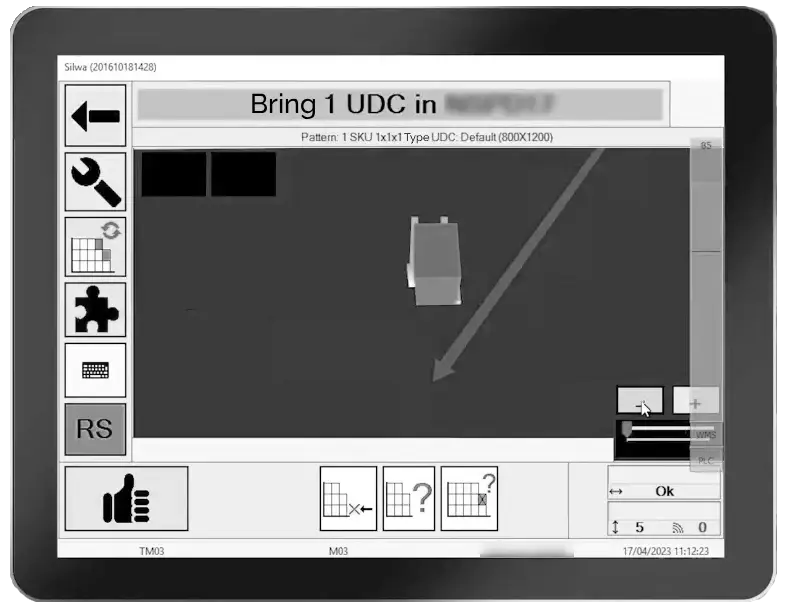
- User Experience and User Interface: is the interface clear and easy to use? UI is often underestimated, yet it directly affects operators’ work quality and satisfaction.
- Multi-site and multi-language support: companies operating across multiple locations and countries must ensure that the WMS can support multi-site, multi-company, and multi-language environments.
- In-depth, guided, and industry-focused research: never limit your evaluation to the most well-known brands. In many cases, the best vendor is one that is vertically specialized in your industry and truly understands its specific needs. A good indicator is the presence of relevant references supporting its expertise (explore your industry sector here). Some software vendors also allow prospects to visit similar logistics facilities, so they can see firsthand how their warehouse could realistically evolve.
- Platform reliability: can the WMS guarantee good performance even during activity peaks? To assess this, it is useful to check whether the system is used by companies operating in industries with strong seasonality peaks.
- Support services: does the vendor have proven experience in providing pre-sales consulting, post-sales support, and operator training and upskilling? If operational issues arise after purchasing the WMS and the only contact available is an impersonal help desk or ineffective assistance, the risk of serious slowdowns is high.
- Licensing model and deployment method: it is crucial to understand whether the WMS is offered on-premise, in the cloud, or as a SaaS solution. Each model has specific advantages in terms of management, updates, costs, and scalability. The cloud/SaaS model, for example, allows more frequent updates and lower infrastructure costs, but it may require stronger guarantees regarding data protection and service continuity compared to on-premise solutions.
- Data security and regulatory compliance: the WMS handles strategic and sensitive information (inventory, orders, traceability). It is important to assess the security measures adopted by the vendor: data encryption, automatic backups, access control, activity logging, and compliance with regulations such as GDPR or certifications such as ISO 27001, SOC 2, and similar. Security is not just an IT requirement; it is a key factor for operational continuity.
What is the best WMS?
On paper, today’s WMS solutions are not very different from one another. The real differences emerge when looking at how they execute specific functions. The way warehouse processes (such as picking) are managed can lead to major differences between two WMS solutions, and this cannot be understood simply by reading a list of specifications or standard features. With very few exceptions, it is difficult to identify a single “best” WMS; rather, there is the one that best fits the needs of a specific logistics system.
For this reason, leading vendors typically provide modular WMS solutions, starting with core modules for managing warehouse operations and adding optional blocks to gradually transform the warehouse into a Warehouse 4.0 environment. Examples include modules for interfacing with automated material-handling devices, business intelligence tools, or modules that allow logistics functions to be accessed from forklift-mounted terminals. Once the core components are implemented, the system can be expanded according to operational needs, potentially reaching an almost fully automated level.
A company in the household retail sector reduced delivery lead time by 1.5 days and transportation costs by 5–10% thanks to the simplification of logistics activities. The WMS implementation project, completed in just 10 months, also improved e-commerce channel management: discover the Kasanova case study.
The right WMS starts with knowing your warehouse
To choose the “right” Warehouse Management System, it is essential to have a deep understanding of your own needs and of your warehouse’s operational dynamics, from inventory turnover rates to the number of missions performed every day, from warehouse layout to the type of goods handled.
This is why it is crucial to rely on the right vendor, one that can combine strong product expertise with integration capabilities and real-world operational experience. A WMS is not simply a piece of software that you install and start using. It requires integration with company management systems, optimization of functionalities based on the warehouse’s specific characteristics and workflows, activation of the appropriate modules to improve logistics, and, finally, staff training and ongoing support.
Take your first steps. Download the brochure and learn more about Stesi’s WMS software.

FAQ: frequently asked questions about WMS software
WMS vs ERP: which is better?
It is not a matter of choosing one over the other. An ERP manages company processes at a macro level (accounting, purchasing, sales), while a WMS focuses specifically on warehouse logistics operations. The two systems are complementary and, for efficient management, must be integrated.
What does a Warehouse Manager do?
The Warehouse Manager is responsible for warehouse operations. They coordinate staff and resources, oversee receiving, storage, picking, and shipping, and ensure efficient logistics flows. They monitor KPIs, optimize space and internal organization, manage inventory, and often act as the interface with systems such as WMS, ERP, and TMS.
How much does WMS software cost?
The cost of a WMS depends on several factors: warehouse size, number of users, level of customization, and required support. Solutions range from entry-level systems for SMEs to enterprise solutions with higher costs. Requesting a tailored quote is recommended.
Are there WMS solutions for SMEs?
Yes. There are WMS solutions specifically designed for small and medium-sized enterprises. They are scalable, modular, and cost-effective, and are designed to grow together with the business. An example is the silwaGO software.
Does implementing a WMS reduce the number of employees?
No, a Warehouse Management System does not necessarily reduce staff numbers. Instead, it allows operators to work more efficiently, reducing errors, idle time, and stress. Employees are upskilled and assigned to higher value-added tasks.
What is the best operating system for a WMS?
Since Microsoft ended support for Windows Embedded in 2020 (the traditional operating system for industrial mobile terminals used in logistics and production), Android has gained popularity as a valid alternative, except for some legacy solutions still running on Windows IoT Core.
Which software does a warehouse operator use?
A warehouse operator may use: a WMS (Warehouse Management System) for operational warehouse management; a TMS (Transport Management System) for outbound transport and carrier assignment; a Dock booking or slot management software.
What is the best inventory management software?
The best inventory management software is a WMS, which enables real-time stock management, reduces counting errors, and supports cycle counting and rolling inventories.
How long does it take to implement a WMS?
Implementation can take from 2 weeks (SaaS solutions) to more than 6 months (custom enterprise solutions), depending on complexity and integrations.
What is WMS software for logistics?
A Warehouse Management System for logistics is a software solution that digitizes and optimizes warehouse operations: from inbound receiving to storage, from picking to shipping. It improves efficiency, traceability, and inventory management.
